Counts real work, not wall-clock
The timer only moves while you're actually typing or moving the mouse. Reading, calls and thinking time past the idle threshold don't count against you.
The break enforcer for Windows
StopBurnout is an activity-aware break timer for Windows 10 and 11. Set your work and break intervals, then choose from three protection levels: gentle reminders or full-screen breaks on every monitor. Try the complete app free for 14 days.
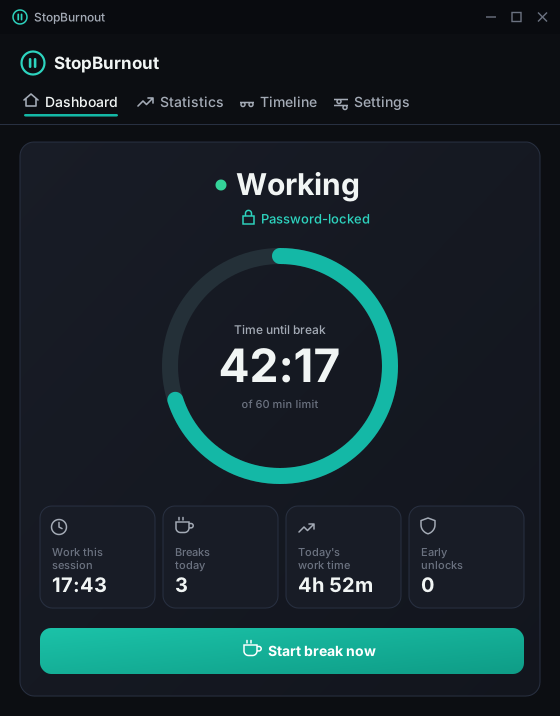
Working
Password-locked
default rhythm — minutes of focus, minutes of enforced break
protection levels, from a friendly nudge to No way out
accounts, servers and trackers — everything stays on your PC
state autosave — a reboot mid-break resumes exactly where it was
What it does
Every break app can remind you. StopBurnout is built for the moment you'd normally click "just 5 more minutes" — and takes that button away.
The timer only moves while you're actually typing or moving the mouse. Reading, calls and thinking time past the idle threshold don't count against you.
Time away from the keyboard is credited back as recovery. A long lunch resets your session — the countdown literally goes back up while you rest.
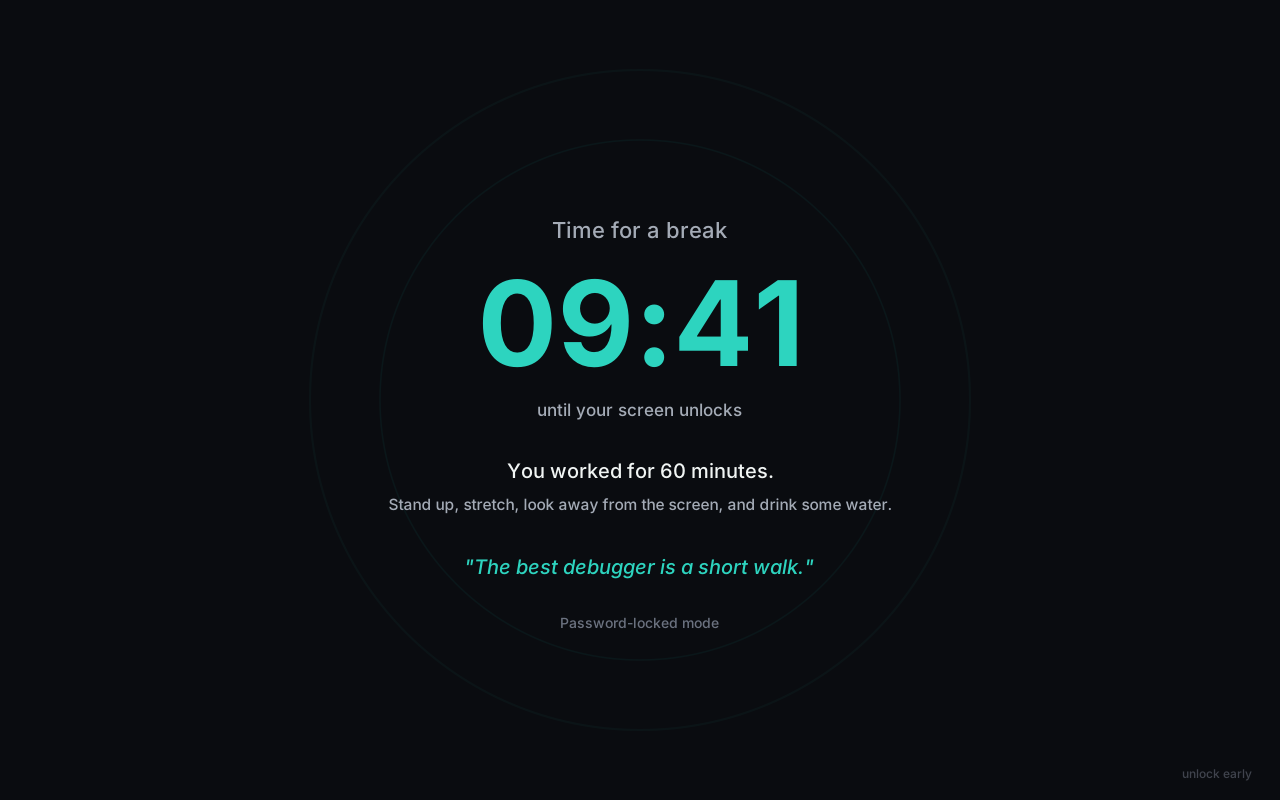
A borderless, always-on-top overlay covers every monitor, swallows Alt+F4, and follows you across virtual desktops. There is no free desktop to escape to.
Let a partner or friend set the password. In locked modes it's the only way to end a break early or weaken your settings — and in No way out, even the password won't end a running break.
No account or telemetry. Your break history stays in a local SQLite file. The timer reads time since your last input, never what you typed. Activation and periodic update checks use the internet.
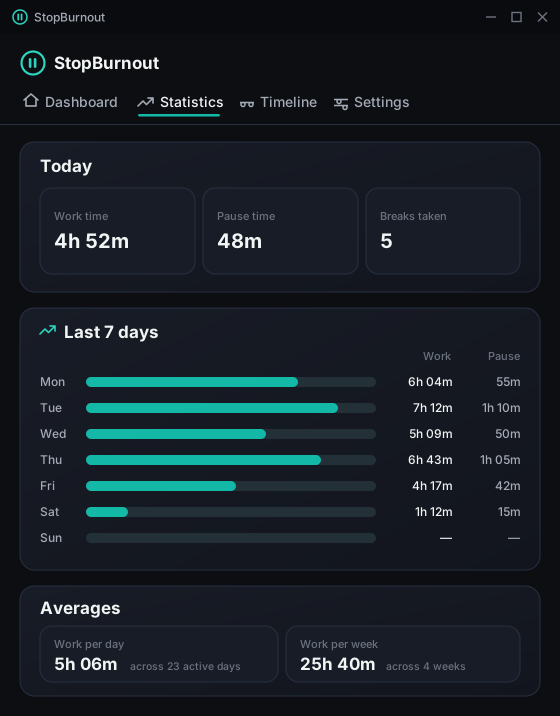
Daily totals, weekly breakdowns, all-time averages — plus a 24-hour timeline of every day. Written to disk every second, so restarts, sleep and reboots never lose a minute.
Want the detail? Read how a break you can't skip works, why it covers every monitor, what makes the timer fair, and why it's local-only by principle — or browse all features.
Protection levels
Three modes, from a polite tap on the shoulder to a door with no handle. You pick the level of trust you deserve today.
A corner notification announces each break. Nothing blocks your screen — whether you actually stop is up to you. The only mode where enforcement can be paused.
Way out: nothing to escape — it's on you
Mandatory full-screen break on every monitor. Thirty seconds in, a dim "unlock early" link appears — ending the break takes your password. The password also guards settings.
Way out: the password, 30 seconds in
No skip, no unlock link — the password doesn't work on a running break either. That refusal is enforced in the core engine, not hidden in the UI.
Way out: none. The break ends when the timer does.
Every emergency unlock is logged locally — time, mode, remaining break — so you can't quietly lie to yourself about how often you bail.
How it works
Every second, the engine checks when your last keyboard or mouse input was. Active work fills the ring toward your limit; going idle past the threshold winds it back down.
A borderless, always-on-top overlay covers all monitors with a countdown, a suggestion, and one of fifty rotating quotes. It cancels close attempts, swallows Alt+F4, and re-appears on whatever virtual desktop you flee to.
Work and pause totals are written to disk every second and archived per day. Statistics shows today, the last 7 days, weekly totals and your all-time averages — and the Timeline replays any day hour by hour: work, breaks, idle, even when the app wasn't running.
Screens
The whole app in five screens. Drag or scroll sideways.
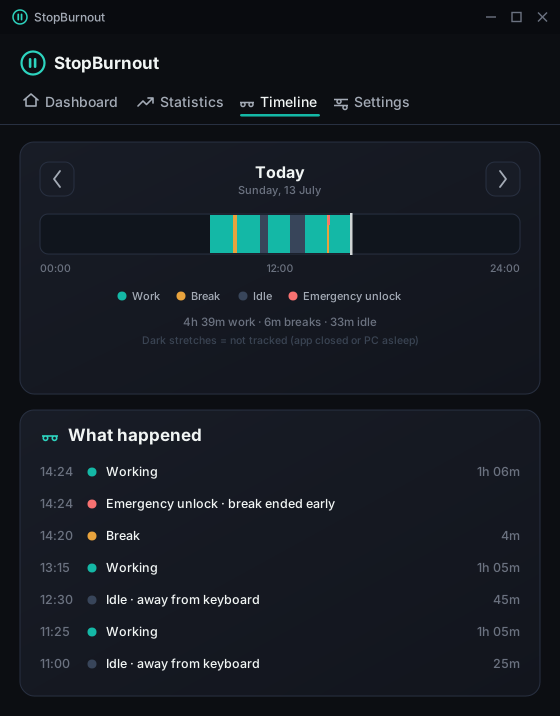
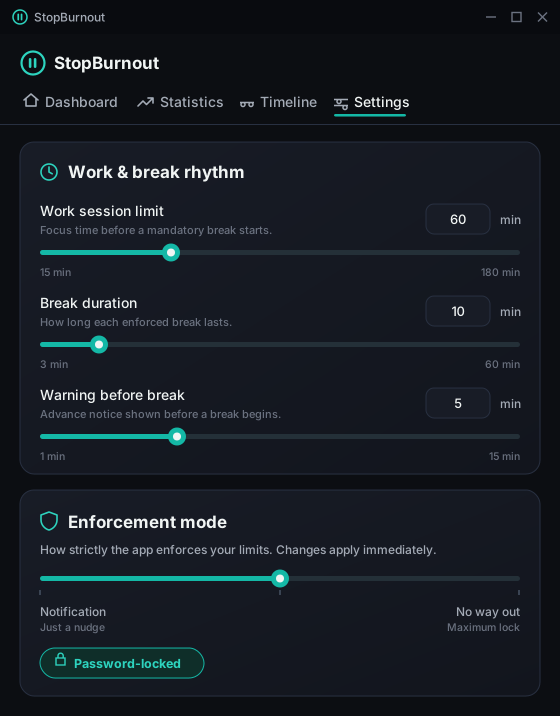
Live demo
This page can't lock your PC (that's the app's job), but it can show you exactly what a break feels like. Pick a mode, start a 30-second break, and try to get out.
Demo only — the real overlay is full-screen on every monitor, swallows Alt+F4, and doesn't have an Esc key.
While you rest, the overlay keeps you company
"Rest is not idleness — it's how your mind files away everything you just did."
The way out is deliberately dim
"unlock early" — small, grey, in the corner, and only after 30 seconds
From the overlay
"Rest is not idleness — it's how your mind files away everything you just did."
"The best debugger is a short walk."
"A tired mind mistakes motion for progress."
"Your shoulders are probably up by your ears right now. Let them drop."
"Machines overheat. So do people. Cooling off is engineering, not laziness."
"Drink some water. Seriously — right now."
"No one ever solved a hard problem by blinking less."
"Burnout is not a badge of honor. Rest is not a weakness."
"An idea in the shower is worth ten at the desk."
"This break is not an interruption of the work. It is part of the work."
Find the right fit
StopBurnout adds a firmer boundary when you keep working through alerts: active-work timing, breaks across every monitor and password-controlled protection. Free reminders, distraction blockers and time trackers can be better choices for other needs.
Pricing
The full app, free for 14 days — no account, no credit card. Like it? A one-time license unlocks it for good, and the earlier you buy, the less you pay.
StopBurnout 1.1.4 · Windows 10/11 · x64
$0 for 14 days — the complete app, nothing crippled
StopBurnout.App.exeAfter 14 days the work timer pauses until a license is entered — a break already in progress always finishes. Your settings and history stay put.
Version 1.1.4 · 41.2 MiB · SHA-256 checksum file · Release notes & verification
74E4A448BE2E9BA076D2A81AA5D66B5E12849DE50C378E4742012982566BDC4D
Unlocks the app after the trial — bought once, yours for good
$9 one-time then
— left at this price · Early bird
Secure checkout by Stripe · cards, Apple Pay & Google Pay
Early buyers support continued development. Your price is locked the moment you buy; it only ever goes up for the people after you.
FAQ
The current Windows app interface is in English. This website and selected buying and setup guides are available in English, German, Spanish and French. The download is the same Windows app in every language.
StopBurnout is a break reminder and activity-aware break timer for Windows. It counts active computer use and prompts you to rest at your chosen interval. Notification mode gives a gentle reminder; the two locked modes cover every monitor.
The complete app is free to try for 14 days, with no account or credit card required. After the trial, a one-time lifetime license activates up to two PCs. It is not a permanently free app; see the pricing section for the current price.
StopBurnout supports Windows 10 and Windows 11 on 64-bit PCs. Download the portable ZIP, extract it and run the app. There is no macOS, Linux, mobile or browser version.
Notification mode does not block work. Password-locked mode allows an early unlock with the password after 30 seconds. No way out mode has no in-app early unlock. These modes do not prevent access to Windows Task Manager or operating-system controls.
Break timing and history stay on your PC, with no account or telemetry. License activation and periodic update checks use the internet; breaks continue to work offline.
The timer uses the time since your last keyboard or mouse input. After the idle threshold, time away is credited as recovery. Passive reading, videos and calls can count as idle too; adjust the idle threshold to fit your work.
One number: how many milliseconds ago your last keyboard or mouse input happened (via the Windows GetLastInputInfo API). It never sees which keys, which apps, or what's on screen. There's no account and no telemetry — all data lives in a local SQLite file you can delete anytime. License activation sends your email, key and an anonymous machine hash to stopburnout.app. The app also checks for updates at startup and every 24 hours; update requests do not include those identifiers. Break tracking and license verification work offline.
Download, extract, run — the 14-day trial starts on first run, with the complete app: every mode, statistics, the timeline. No account, no credit card, no crippled features. When it ends, the work timer pauses until you enter a license (a break already in progress always finishes), and your settings and history stay exactly where they were.
Possibly — no input past the idle threshold counts as recovery and rewinds the work timer. If that annoys you, raise the idle threshold (up to 10 minutes) in Settings so quiet stretches still count as work. It errs on the side of giving you credit for rest, not stealing credit for work.
Accountability you can't negotiate with at 11 pm. A password is set during setup — ideally by someone you trust, so you can't simply type it yourself. In Password-locked mode it's the only way to end a break early (via a dim "unlock early" link that appears 30 seconds in), and in both locked modes every settings change requires it. And a break that's already running can't be reconfigured away — the overlay blocks Settings anyway.
The scheduled end of the break is saved on disk. If you reopen the app before that time, the remaining break resumes. Time spent asleep or powered off still passes toward that fixed end time.
There is no in-app skip button or password override during a running break. It is a commitment tool, not a Windows security boundary: Task Manager and operating-system controls remain available. Choose this mode only when you want that stronger in-app boundary.
It's early-supporter pricing: the first 100 licenses cost $9, then the price steps up automatically as more people buy. Early buyers take the most risk on a young product, so they pay the least — and every tier funds the roadmap. Whatever you pay, your license is lifetime; the increases only ever apply to people after you.
A lifetime license key and every future update — no subscription, no upsells, no "pro" tier. One key activates up to 2 of your machines. Activation registers an anonymous machine hash online. Break timing, history and license verification stay local; periodic update checks use the internet.
When you activate, the app sends your email, key and an anonymous hash of your machine to stopburnout.app, which counts activations per key — up to 2 — and returns a token bound to that machine. Verification after that is fully offline, and re-activating the same machine (reinstall, wiped database) never costs a second slot. Replaced a PC? Write to hello@stopburnout.app and we'll free the old slot.
See how activity-based timing works, follow the Windows 11 break reminder setup guide, or compare the best break reminder apps for Windows, including free alternatives.
Already using a reminder? Fix missing Windows break alerts, plan breaks around meetings, or choose a stretch reminder.
From the blog
Practical, no-hype writing on burnout, focus and healthy screen time — including what to look for in a break app, whichever one you end up choosing.
Exact steps for Focus sessions and Clock timers, plus when a dedicated app makes sense.
Read article ComparisonsFree scheduling and easy snooze, or a stricter activity-aware Windows break boundary?
Read article Buyer's guideSeven tests for enforcement, activity timing, every-monitor coverage, privacy and price.
Read articleDownload it free, set your rhythm once, and let the machine hold the line your willpower won't. Fourteen days later you'll know if it's worth $9 — once, forever.
Time for a break
You worked for 60 minutes. Stand up, stretch — this card won't stop you, but it will keep counting.
0:30