Somewhere on your machine is a graveyard of good intentions: a Pomodoro app you opened twice, a browser extension that pings you to stretch, maybe a smartwatch that buzzes "Time to stand!" while you wave it away without breaking eye contact with the screen. None of them were bad products. They all share one design assumption that quietly dooms them.
The reminder graveyard
A reminder's job is to surface information: it's time for a break. It assumes the reason you're not taking breaks is that you forgot. And for the first few days, that's true — the reminder fills a genuine gap and you feel great.
But you don't skip breaks because you forget. You skip them because, at the moment the reminder fires, you're mid-thought and you decide — rationally, in that instant — that finishing is worth more than resting. The reminder delivered its information perfectly. You considered it and said "not now." Repeat that a dozen times and the notification becomes wallpaper: something your eyes slide over without a flicker of response. Psychologists call it habituation. You call it "that thing I muted."
A reminder asks your permission. An enforcer changes your environment. Only one of those still works on a bad day.
Reminder vs. enforcer: the real difference
The distinction is about where the decision lives. Line them up:
- A reminder puts the decision in the moment — every single time. It relies on you choosing rest over "just one more thing" while you're deep in focus and short on willpower. It's a vote, and you're allowed to vote no.
- An enforcer puts the decision in advance. You set the rule once, while calm and rested. When the moment comes, there's no vote — the break simply happens, and continuing to work is the harder path. It's not fighting your willpower; it's removing the need for it.
This is the same reason a payday auto-transfer beats "trying to save what's left," and why leaving your phone in another room beats "trying not to check it." In every case the winning move is to decide once, ahead of time, and let the environment carry the decision — instead of re-litigating it against your weakest self, live, on repeat.
Where Pomodoro shines (and where it doesn't)
To be clear: the Pomodoro Technique is genuinely good, and for a lot of people it's enough. Francesco Cirillo's method — 25 minutes of focus, a 5-minute break, a longer break every four rounds — is brilliant at two things:
- Beating procrastination. "Just do one 25-minute round" is a wonderfully small ask that gets you past the blank-page dread of starting.
- Making time visible. The ticking timer turns a vague afternoon into countable chunks, which helps you estimate and stay honest.
Where it struggles is exactly where enforcement matters:
- The break is on the honor system. Classic Pomodoro is a technique, not a lock. When the 25 minutes end, nothing stops you from steamrolling into the break — and on a busy day, you will.
- 25 minutes can fragment deep work. For coding, writing or design, a hard stop right as you hit flow can do more harm than the break repairs. Many people prefer longer focus blocks — 50, 60, 90 minutes — with a properly protected break at the end.
- It doesn't measure real work. A Pomodoro timer counts wall-clock, not effort. Step away for a call and it keeps ticking; grind through lunch and it never notices.
So the honest summary: if reminders and Pomodoro already work for you, wonderful — keep going, and skip the rest of this article guilt-free. This is for the people who keep meaning to, keep dismissing the chime, and keep ending the day with a stiff neck and zero breaks logged.
What enforcement actually looks like
For the mechanics — every escape route a forced break has to close, and a five-minute test you can run on any app — see a break reminder you can't skip.
"Enforcement" sounds harsh — like software fighting you. Done right, it's the opposite: it's a spectrum, and you choose how firm it is based on how much you trust yourself on a given day. StopBurnout, for instance, ships three levels:
- Notification. A corner card announces the break; nothing blocks your screen. This is the classic reminder — honest about being skippable, and the only mode where you can pause enforcement. Fine for good days and disciplined people.
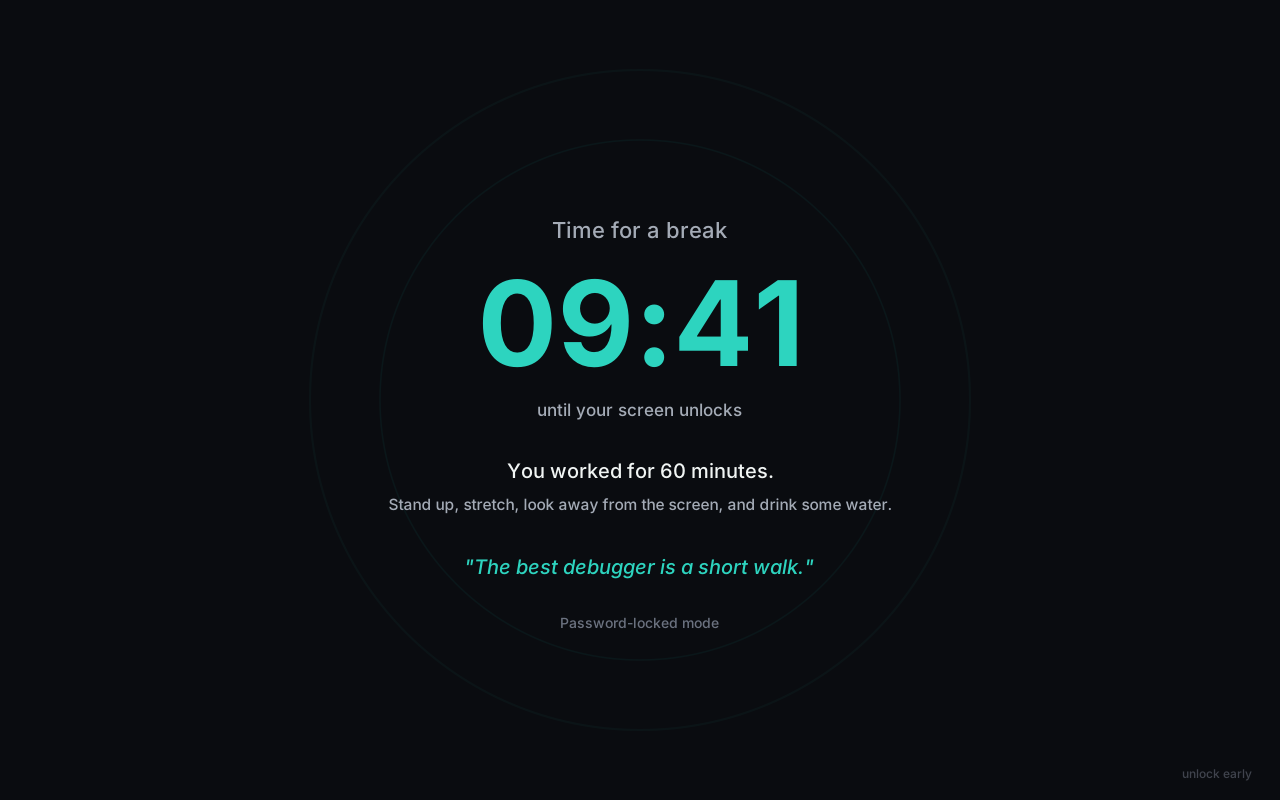
- Password-locked. The break covers every monitor full-screen. Thirty seconds in, a deliberately dim "unlock early" link appears — and ending the break early takes a password. The trick: you let someone you trust set that password. Now "five more minutes" requires a conversation, not a keystroke.
- No way out. No skip, no unlock link, and the password is refused on a running break. The break ends when the timer ends, full stop. You pick this only when it's genuinely what you want from yourself.
Two details make enforcement humane rather than hostile. First, it should count real work — pausing the timer when you step away, so it never locks you out mid-coffee for time you didn't spend working. Second, it should refuse to fight your operating system: a good break enforcer never blocks Task Manager or Ctrl+Alt+Del, because software that hijacks your OS is malware, not wellness. The firmness is in the friction, not in trapping you.
Choosing the right level for you
You don't have to jump to maximum firmness. Match the level to the honest answer to "how often do I actually skip?":
- You take breaks fine, you just lose track of time? A reminder or Notification mode is plenty. You have the discipline; you only needed the cue.
- You dismiss reminders and regret it by evening? Step up to a locked break with a password held by a partner or colleague. This is the sweet spot for most overworkers — enough friction to matter, an escape hatch for real emergencies.
- You know you'll bypass anything you can bypass? Then no-way-out honesty is your friend. Choose it deliberately, for defined stretches, when protecting your health matters more than your own in-the-moment vote.
The meta-point outlasts any single app: stop asking your tired self to make your rested self's decisions. A reminder hands the choice back to the person least able to make it. An enforcer keeps the promise you already made. Pick the gentlest level that actually gets you to stop — and let it carry the decision you keep losing.
A break you can't dismiss with a shrug
StopBurnout watches your real working time and, at your limit, locks every screen for a full break — Notification, Password-locked, or No way out, your call. Set the rhythm once and let the machine hold the line. Free for 14 days, no account, 100% local.